If you’ve used FamilySearch’s Full-Text Search feature, you know it feels like magic. For decades, finding ancestor details in unindexed records meant clicking through digital image rolls page by page; essentially flipping through thousands of dusty microfilm frames on your computer screen. Before then, you had to physically visit the archive where the microfilms were kept.
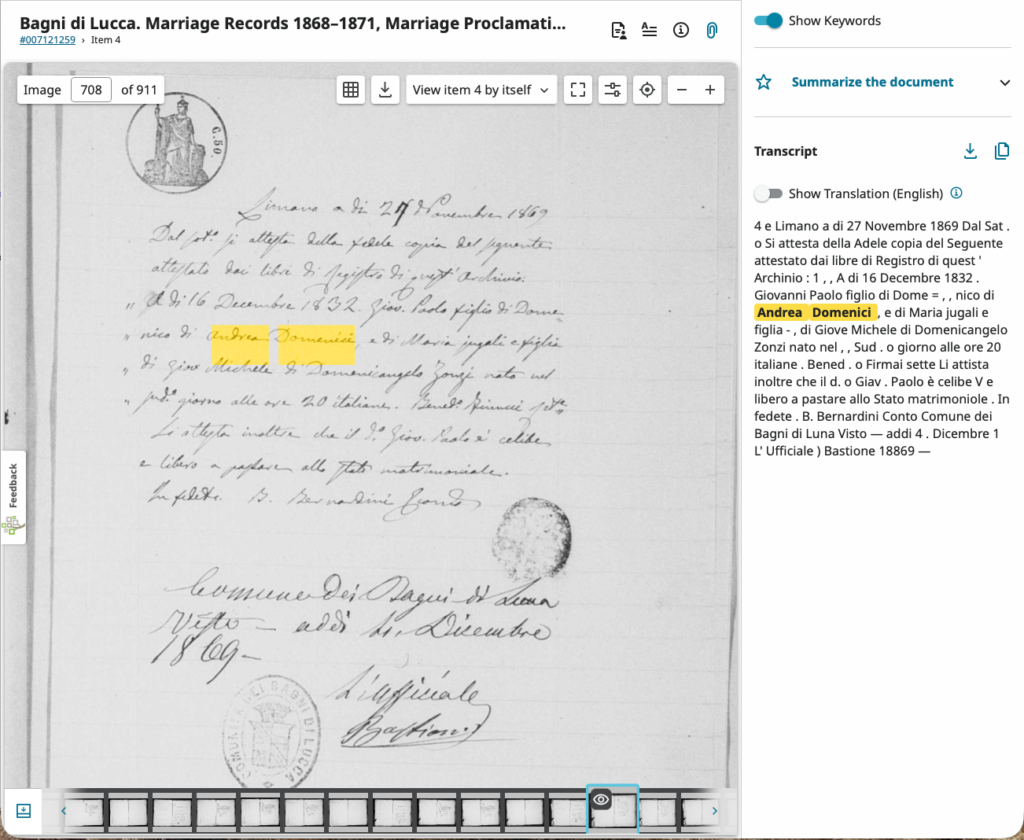
With FamilySearch full-text search, you can now type a name or place, and within a fraction of a second, the exact document appears on your screen with your search term highlighted in bright yellow.
How does a computer read centuries-old handwriting across millions of documents almost instantly? It comes down to a clever two-step process: Reading beforehand and Indexing like an index in a book.
Step 1: AI “Reads” Everything in Advance (Handwritten Text Recognition)
The most important thing to know is that FamilySearch is not reading the original documents when you hit “Search.” Reading handwriting takes enormous computing power, so doing it live would crash the system or take minutes per query.
Instead, specialized AI called Handwritten Text Recognition (HTR) processes the images months before you ever log on. Here is how it’s done:
- The Detective (Layout Analysis): Before reading a single word, the AI scans the page to figure out its layout. It separates printed headers from handwritten entries, identifies columns, and draws invisible boxes around every single line of text—even if the ink is faded or the writing slants across the page.
- The Expert Translator (Line-by-Line AI): Older computer scanning (OCR) read documents letter by letter. If an “a” looked like an “o”, it failed. Modern AI reads entire lines at once, using context just like a human reader. If a handwritten word looks like “J-h-n”, the AI knows the surrounding sentence makes “John” far more likely than “Joan.”
- The Mapmakers: As the AI transcribes each word, it records its exact location on the image, all the way down to the precise pixel coordinates.
Step 2: Bulding the World’s Biggest Index (Sub-Second Searching)
Once the AI turns handwritten ink into digital text, it organizes those words into an inverted index. What does that mean? Imagine trying to find every mention of the word “miller” in a 1,000-page historical book. Reading page by page would take hours. But if you flip to the index at the back of the book, you simply look up “Miller” and immediately see: Pages 12, 45, 108, 230.
FamilySearch’s system creates a massive “back-of-the-book index” for billions of historical pages. So, when you type a name or a location into the search box:
- The search engine doesn’t open or look at a single picture.
- It looks up your query in its digital index built from pre-transcribed documents.
- The index instantly points to the exact document ID and pixel location, presenting a list of “hits” where your search terms were identified.
- When you click on a “hit” in your results list, the system loads the image and draws a highlighted box around the word using those pre-saved coordinates (see example to the right).
In other words, you get instantaneous results across millions of unindexed land deeds, probate files, and court records that previously required months or years of manual browsing. Perhaps even more exciting: you can find documents, locations, and contexts in which you never would have thought to look for your ancestor.
Putting AI to the Test: A Real-World Brick Wall in Bagni di Lucca
Understanding the technology behind full-text AI search is one thing, but how does it perform in practice when applied to a stubborn genealogical puzzle?
If you’ve been following my previous posts, you know all about my pet brick wall: the hunt for Andrea Domenici and his wife Giovanna, the parents of my 4x great-grandmother Maria Domenici (1822–1858). That search morphed into a massive mapping project of the entire Domenici surname in Bagni di Lucca, Italy. Up to this point, my research strategy involved brute-force indexing:
- 1866–1920: Extracted every Domenici mention from all available official civil indexes across birth, marriage, and death records.
- 1807–1813 & 1850–1865: Manually sifted through unindexed vital records to identify Domenici individuals across specific villages like Limano, Benabbio, and San Cassiano di Controne (villages where the surname was common).
- Deep Extractions: Documented every Domenici listed as a witness, declarant, or indirect participant whenever identified.
- Cluster Building: Reconstructed tens of family clusters spanning 2 to 5 generations back to the 1700s, adding hundreds of individuals to the database.
- Genetic Connections: Integrated DNA results from my nonno, who has DNA matches with clear Limano ancestry. While no formal documentary connection has been completed yet, these family trees are built out in the database waiting for the final piece of the puzzle to fall into place.
After hearing about FamilySearch’s Full-Text Search on the Research Like A Pro podcast, I realized this tool was made for a project like mine. It offered a way to instantly search unindexed records for references to Andrea Domenici where he wasn’t the primary subject—like marriage supplements or witness lists—without flipping through digital microfilms image by image. Plus, it served as a perfect pilot test for how well the AI handles Italian handwriting from Bagni di Lucca.
So, does it actually work?
Part 2 coming soon…
Leave a Reply